
Are you a healthcare facility wondering how to get paid for your ancillary services and patient stays? The UB-04 claim form is the key. It is a standardized form that payers accept for facility-related charges.
However, understanding it requires attention to detail. Luckily, this guide covers everything you need to know about it, from its significance to tips and filling it accurately. So, continue reading!
Significance of UB-04 Claim Form for Healthcare Facilities
Before we discuss the benefits of the UB-04 form, it is integral to understand that it is also known as the CMS-1450 form.
It is used by facilities, such as skilled nursing facilities (SNFs), hospitals, and rehabilitation centers, to capture the high-complexity costs of facility-based care.
Here’s how it helps:
- The CMS-1450 claim form is a standardized format that enables healthcare facilities to communicate complex inpatient stays to different payers.
- It is the primary means for securing reimbursement for ‘room and board’ and ancillary services, such as operating room usage, pharmacy, and supplies.
- It provides a transparent audit trail. That is, you can use the UB-04 claim form as the official document during audits to justify the level of care provided.
- Its structured layout allows facilities to clearly identify primary, secondary, and tertiary payers.
- CMS-1450 provides the raw data (diagnoses and procedures) required for Prospective Payment Systems (PPS) and Diagnosis-Related Groups (DRG). This critical information helps determine the flat-rate payments facilities receive for specific conditions.
- That’s not all, payers and federal agencies can leverage the data from the CMS-1450 form to track treatment efficacy, hospital readmission rates, and disease trends.
How to Fill Out a UB-04 Form?
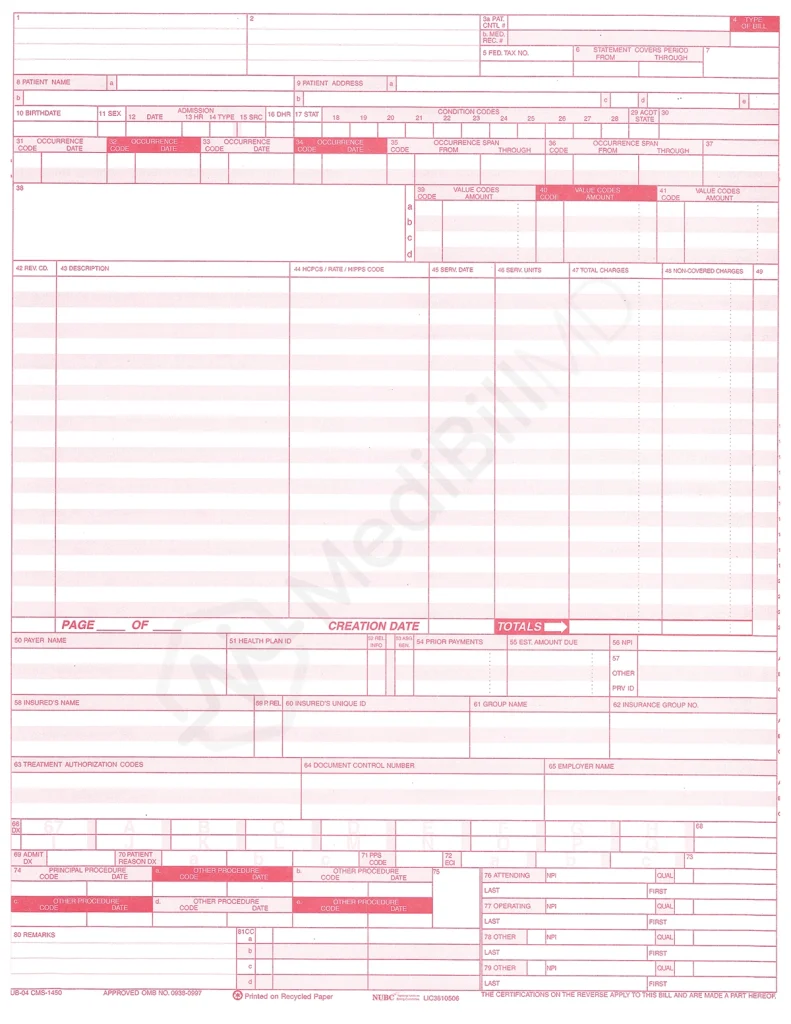
We have divided the UB-04 claim form into different sections to simplify the process of filling it:
Facility & Billing Information (Fields 1–6)
This section of the CMS-1450 form identifies the nature of the medical claim. It covers details such as the provider’s name, address, NPI, and the type of bill.
| Field Locator | Field Details | How To Fill It? |
|---|---|---|
| FL 1 | Provider name, address | Write the facility’s legal name, full physical address, and telephone number. |
| FL 2 | Pay-to-name, address | State the name and address to which payment should be sent. (optional) |
| FL 3a | Patient control number | Unique ID assigned by your practice management system for internal tracking. |
| FL 3b | Patient’s medical record number | Enter the patient’s permanent ID for tracking. |
| FL4 | Type of Bill | Mention the 4-digit code. |
| FL 5 | Tax ID | Enter the facility’s federal tax ID (EIN). |
| FL 6 | Statement Covers Period | Provide the beginning and ending service dates for the period covered on the claim. |
What Are Bill Types for UB-04?
It is the field locator 4 in the UB-04 claim form. A 4-digit number that offers the payer the following information:
- Where did the service take place?
- What kind of care was it?
- What was the sequence of the claim?
| 1st Digit | 2nd Digit | 3rd Digit | 4th Digit |
|---|---|---|---|
| It is always a ‘zero’. | It specifies the type of facility. For example, 1 = Hospital, 2 = SNF, 3 = Home health, etc. | It identifies the type of care. For example, 1 = Inpatient (part A), 3 = Outpatient, etc. | It indicates the sequence of the bill. For example, 0 = Non-payment/zero claim, 1 = Admit through discharge, etc. |
Patient Demographics & Admission (Fields 7–17)
These fields of the UB-04 claim form require you to provide details about the patient’s identity and the clinical specifics of their arrival. These include the date, hour, and priority of their admission through to their final discharge status.
| Field Locator | Field Details | How To Fill It? |
|---|---|---|
| FL 7 | Reserved | Leave it blank |
| FL 8 | Patient name | Enter the patient’s name exactly as it appears on their insurance card. |
| FL 9 | Patient address | Write the full street address, city, state, and ZIP code. |
| FL 10 | Birthdate | Enter the patient’s date of birth. Use the 8-digit format MMDDYYYY. |
| FL 11 | Sex | Specify the gender of the patient. |
| FL 12–13 | Admission date, hour | Use the 8-digit MMDDYYYY format for admission date, and 2-digit military time (00–23) to specify hours. |
| FL 14 | Admission type | Enter a 1-digit code to specify the priority of admission, e.g., 1 for emergency, 2 for urgent, 3 for elective, 4 for newborn, etc. |
| FL 15 | Source of admission | Specify whether it is a physician referral, transfer from another facility, etc., using 1 numeric character. |
| FL 16 | Discharge hour | Use 2-digit military time (00–23). |
| FL 17 | Discharge status | Mention the 2-digit code explaining where the patient went, e.g., 01 (home), 03 (SNF), etc. |
Medical Events & Values (Fields 18–41)
In this section of the CMS-1450 form, you must report special circumstances, accident details, significant date ranges (occurrence spans), and specific dollar values related to insurance calculations.
| Field Locator | Field Details | How To Fill It? |
|---|---|---|
| FL 18-28 | Condition codes | Use 2-digit alphanumeric codes for special circumstances that may affect the processing of this claim. |
| FL 29 | Accident state | Mention the 2-digit state abbreviation where the accident occurred. |
| FL 30 | Reserved | Leave it blank |
| FL 31-34 | Occurrence codes, dates | These fields identify events, like accidents or the symptom onset. Enter the 2-digit code in ‘a’ and the date in ‘b’. |
| FL 35-36 | Occurrence span | These fields are used for events that happened over a range of time. Enter the 2-digit code in the code box, followed by the ‘from’ and ‘through’ dates. |
| FL 37 | Reserved | Leave it blank |
| FL 38 | Responsible party name and address | Fill this field if someone other than the patient is financially responsible for the bill. |
| FL 39-41 | Value codes | These codes are used for monetary amounts, like Medicare deductibles or semi-private room rates. In the amount box, enter the number, amount, orUCR value associated with that code. Refer to the NUBC manual for specific codes. |
What Are Condition Codes for UB-04?
Condition codes are entered in the field locators 18-28 on the UB-04 claim form. They are two-digit alphanumeric or numeric codes that describe clinical conditions, specific circumstances, or insurance events that affect how a claim is processed or paid.
Simply put, these codes explain the context of the visit.
Some examples of these codes are:
- 02: The patient’s condition is related to their job.
- 09: Neither the patient nor the spouse is employed.
- 17: The patient is homeless.
- MB: The patient has pneumonia (acute comorbid).
Revenue Codes & Charges (Fields 42–49)
The following fields of the UB-04 claim form cover the itemized financial ledger of the claim. That is, it helps you categorize services by department, assign CPT/HCPCS codes, and list the total units and associated costs.
| Field Locator | Field Details | How To Fill It? |
|---|---|---|
| FL 42-43 | Revenue code, description | Mention the specific four-digit revenue code beside eachservice described in FL 43. E.g., 0481, cardiology cardiac catheterization (cath) lab. |
| FL 44 | HCPCS/Rates | Enter the CPT/HCPCS code that corresponds with the revenue code. |
| FL 45 | Service date | State the date of service in 8-digit format MMDDYYYY. |
| FL 46 | Service units | Specify the corresponding number of units on the same line in FL 46 for every revenue code listed in FL 42. |
| FL 47 | Total charges | Mention the total dollar amount for that specific line item. |
| FL 48 | Non-covered charges. | Enter the amount of charge not covered by the payer. |
| FL 49 | Reserved | Leave it blank |
Payer & Diagnosis Information (Fields 50–68)
From fields 50 through 68 of the CMS-1450 form, designate the insurance carriers in order of responsibility. Besides, you must add the specific ICD-10-CM codes to justify the medical necessity of the rendered services.
| Field Locator | Field Details | How To Fill It? |
|---|---|---|
| FL 50 | Payer name | List insurers in order of priority (primary, secondary). |
| FL 51 | Health plan ID | It is the number that the health plan uses to identify itself. |
| FL 52 | Release of information | It denotes if the patient has given their consent to release their medical information to the payer. Write ‘Y’ for yes, or ‘N’ for no. |
| FL 53 | Assignment of benefits | It indicates if the patient has authorized the payment to be sent to you directly. Enter ‘Y’ for yes, or ‘N’ for no. |
| FL 54 | Prior payments | This field is for reporting amounts that have already been paid (e.g., the primary payer has paid) toward the current bill. |
| FL 55 | Estimated amount due | Enter the remaining amount that you have yet to receive from the secondary and/or tertiary payer. |
| FL 56 | National Provider Identifier (NPI) | Mention the facility’s NPI. |
| FL 57 | Other provider ID | Enter any other identifier beyond NPI to help the payer identify you. |
| FL 58 | Insured’s name | Enter the insured’s name if other health insurance is involved. |
| FL 59 | Patient’s relation to the insured | Specify the code for the patient’s relationship to theInsured, e.g., 01 for spouse. |
| FL 60 | Insured’s unique identifier | Enter the beneficiary’s insurance number as stated on their card. |
| FL 61 | Group name | Mention the name of the insured’s other group healthcoverage (if applicable). |
| FL 62 | Insurance group number | Provide the insured’s group number (if applicable). |
| FL 63 | Treatment authorizationcodes | Write the specific alphanumeric authorization number provided by the payer. |
| FL 64 | Document control number (DCN) | Control number assigned to the original bill. (This field is only used for corrected or voided claims.) |
| FL 65 | Employer name | Enter the name of the employer that provides the health insurance coverage. |
| FL 66 | Diagnosis and procedure code qualifier | Mention the number 0 to indicate ICD-10-CM. |
| FL 67 | Principal diagnosis code | Enter the most specific ICD-10 diagnosis code with the decimal point. E.g., H26.491 for other secondary cataract, right eye. |
| FL 68 | Reserved | Leave it blank |
| FL 69 | Admitting diagnosis | Enter the ICD-10 code that was assigned at the time of the patient’s admission. It can be different from FL 67. |
| FL 70 | Patient’s reason for visit | Mention the diagnosis code that describes the patient’s reason for visit. |
Professional & Procedural Identification (Fields 71–80)
This final section of the UB-04 claim form covers the primary surgical procedures. Additionally, it requires details related to the specific attending, operating, and referring physicians responsible for the patient’s care.
Mistakes in Filling UB-04 Claim Form
Discussed below are some common mistakes facilities make while filling out the CMS-1450 form:
Coding & Logical Mismatches
Some of the coding and form-filling mistakes that you can make, which lead to payment delays or denials, are listed below:
Revenue & HCPCS/CPT Codes Mismatch
If your reported revenue code (FL 42) does not align with the HCPCS/CPT code (FL 44), gear up for a denial.
Example: You entered a revenue code 0450 that represents that the service was rendered in the emergency room. However, the FL 44 field has a CPT code 99386 that indicates a well-patient visit for a new patient aged between 40 and 64. This will be considered a mismatch and trigger a denial.
Reporting Decimal Points with ICD-10 Codes
As discussed earlier, you should not use a decimal point while reporting the ICD-10 codes (FL 67 and 74) in your electronic claims. Decimals are embedded into the electronic claim forms. However, the payer does not see them.
Using decimal points with ICD-10 codes when filling out the electronic UB-04 claim form is one of the most common mistakes facilities make.
Example: Writing E11.9 (type 2 diabetes mellitus without complications) instead of E119 is unnecessary.
The Date Gap Error
Your ‘statement covers period’, i.e., FL 6 must cover all care service dates listed in the individual line items (FL 45). In case a line item date falls outside this range, the payer will flag your CMS-1450 form as inconsistent.
Example: You mentioned 010126 (From) and 010326 (Through) in FL 6. It means that you are highlighting to the payer that you are billing for everything that happened between January 1 and January 3, 2026.
However, on one of the line items for an X-ray, your staff accidentally entered 010426 (January 4). As a result, the payer will reject the payment for the claim.
Professional Identification Errors
Errors in professional identification are another common issue in the UB-04 claim form that leads to payment denial. Here’s what could go wrong:
NPI Confusion
Mistakenly added the facility’s group NPI in the attending physician field. Remember that FL 76-79 requires you to add the individual healthcare provider’s NPI.
Discharge & Status Inconsistencies
Patient status and discharge details should be consistent throughout the CMS-1450 form and your documentation. If these details do not align, payment delay can occur.
Patient Discharge Status Error
Let’s say you entered the code 01 in the patient discharge status field (FL 17), which means discharged to home. However, the clinical notes indicate a transfer to an SNF. This inconsistency is enough to result in a denial.
Same Day Admit/Discharge
You may encounter scenarios where the patient is admitted and transferred on the same day. When this happens, you must use condition code 40. If you forget this, the system may view it as a duplicate or erroneous entry.
UB-04 Billing Guidelines by Payer
The following are some essential billing guidelines related to the UB-04 claim form:
- Print on official CMS-1450 forms (red ink) since scanners reject black-and-white copies.
- Avoid handwritten claims. That is, ensure to use a 10-point Arial or Courier font and try not to touch or cross the red lines of the boxes.
- Do not use decimal points for ICD-10 codes.
- Utilize the 00–23 hour format for admission (FL 13) and discharge (FL 16) hour details.
- Each service line (FL 42) must have at least 1 unit listed in FL 46.
- Every individual service date (FL 45) must fall within the ‘statement covers period’ (FL 6).
- Validate that the discharge status (FL 17) aligns with the type of bill (FL 4).
- Ensure to enter the individual NPI for the physicians (FL 76-79), not the facility’s group NPI.
- Double-check that the authorization number (FL 63) is valid and matches the payer’s records exactly.
- In case of an accident, you must include the correct occurrence code (FL 31–34) and the date it happened.
UB-04 in Electronic Claim Submission (837I File Format)
The CMS-1450 form (UB-04) is the paper form used to submit institutional claims through mail, fax, or scan. Contrarily, the EDI 837I is its electronic equivalent, submitted digitally through a clearinghouse or directly to payers.
How to Get the UB-04 Claim Form?
The National Uniform Billing Committee (NUBC) is responsible for designing the CMS-1450 form. Besides, only this organization is capable of awarding the contract to print it.
Note: Centers for Medicare and Medicaid Services (CMS) cannot provide the UB-04 claim form to healthcare providers for claim submission.
In case you want the paper copy of this form, you can obtain it via two methods:
(1) From the Standard Register Company, Forms Division
(2) Through the office supply stores in your area.
Conclusion
Phew! So many details to follow through. This guide is a humble reminder of the intricacies surrounding the facility billing process. One simple mistake, like adding a decimal point in ICD-10 codes or using the wrong date format, is enough to get a denial.
Are you struggling with the same issues when submitting the UB-04 claim form? Do not worry. Partner with a reputable medical billing company like MediBillMD for professional denial management services to reclaim your lost revenue.